
Service Announcements
Septembber 3, 2026: Magic Sorter Now Supports BigCommerce Multi-Storefront
We’re excited to announce that Magic Sorter now fully supports BigCommerce Multi-Storefront stores. If you’re using BigCommerce Multi-Storefront, you can now create custom sort orders for your products and collections in more than just your primary store!
Magic Sorter makes it easy to arrange your catalog the way you want customers to see it – whether that’s by price, popularity, inventory levels, or any other criteria. Set up different sort orders for different collections, update them anytime, and stop wasting time manually reorganizing products.
- Custom sort orders. Sort by price, popularity, date added, inventory, ratings, or any attribute.
- No coding required. Control everything from a simple dashboard.
- Update anytime. Change your sort rules in minutes whenever you need to.
- Handle large catalogs. Works smoothly whether you’ve got 100 products or 10,000.
September 2, 2026 Updates: Four New Shopify Import & Export Tools
We’ve added four new tools for Shopify stores, all built around one simple idea: make it much easier to get your product and collection data out of Shopify, work with it in a spreadsheet, and put the changes right back in.
The new Export Products, Import Products, Export Collections, and Import Collections tools work together, so you can export your data to CSV or Excel, make bulk changes using the spreadsheet tools you already know, and re-import the finished file without editing everything one item at a time in Shopify.
New: Shopify Product Export & Import Tools
Export your catalog, make your changes in Excel or CSV, and import them back into Shopify.
Our new Export Products and Import Products tools give Shopify merchants a much more flexible way to work with large catalogs. Export Products pulls your product and variant information into a spreadsheet with one row per variant, while Import Products lets you take that spreadsheet, make your changes, and push them back into your store.
- Export the product information you actually need. Include product titles, descriptions, vendors, types, tags, status, SEO information, collections, images, SKUs, options, prices, costs, barcodes, weights, and inventory.
- Export all products or narrow things down first. Choose a collection or filter products by title, vendor, type, tag, or status before creating your spreadsheet.
- Update existing variants by SKU. Import Products can match Shopify variants using their SKU, making it particularly useful when you’re working with ERP exports, supplier files, warehouse data, or other spreadsheets organized around SKUs.
- Only change the fields you want to change. Blank cells aren’t sent to Shopify, so a spreadsheet containing just SKU and price can be used for a price update without touching descriptions, tags, images, or other product information.
- Create products and variants in bulk. When enabled, Import Products can create completely new products or add new variants to products that already exist.
- Export, edit, and re-import. The Export Products file is designed to feed directly into Import Products, making it easy to export your catalog, make bulk changes in a spreadsheet, and send the updated information back to Shopify.
If you’ve ever found yourself opening dozens or hundreds of products in Shopify just to make the same type of change over and over again, this is exactly the workflow these tools are designed to replace.
Learn more: Export Products for Shopify | Import Products for Shopify
New: Shopify Collection Export & Import Tools
Finally, a practical way to manage Shopify collections and their rules from a spreadsheet.
Collections can become surprisingly complicated once a Shopify store grows. Our new Export Collections and Import Collections tools let you move that work into a spreadsheet instead, including not just the collection name and description, but the rules and product assignments that actually determine what’s in the collection.
- Export complete collection information. Pull collection titles, descriptions, SEO information, images, sort order, publish state, metafields, automated rules, manually added products, exclusions, and sub-collection information into CSV or Excel.
- See collection rules in a spreadsheet. Instead of opening collections one at a time to figure out how they’re configured, you can review automated and manual collections, their conditions, and their exclusions in one file.
- Bulk-edit existing collections. Change collection information or rules in your spreadsheet and use Import Collections to push those updates back into Shopify.
- Create collections in bulk. Import Collections can create new collections from your spreadsheet when the Create New Collections option is enabled.
- Delete collections in bulk. Collections can be marked with a
DELETEcommand in the spreadsheet and removed during the import. - Move collections between Shopify stores. Because product references can use handles and SKUs instead of store-specific Shopify IDs, the export/import workflow can also be used when moving collection configurations from one store to another.
Just like the product tools, the two collection tools are designed to work together. Export your collections, make the changes you need in the spreadsheet, and re-import the same file. It’s especially useful for stores with large numbers of seasonal, brand, category, or automatically generated collections that would otherwise have to be managed one at a time.
Learn more: Export Collections for Shopify | Import Collections for Shopify
A Much Easier Export → Edit → Import Workflow
The biggest advantage isn’t any one of these tools by itself. It’s how they work together. You can now pull a large section of your Shopify catalog or collection structure into Excel or CSV, make hundreds of changes using familiar spreadsheet tools, and import the finished file back into Shopify.
- Export Products → edit → Import Products for bulk catalog and variant changes.
- Export Collections → edit → Import Collections for bulk collection, rule, and product-assignment changes.
- CSV and Excel support means you can work in the spreadsheet application you’re already comfortable using.
- Background processing means larger imports and exports can run without keeping the tool page open.
- Error reporting on imports helps identify individual rows or collections that need attention so you can correct them and re-import the problem data.
Ready to try them? Log in to your Your Store Tools dashboard to start using the new Shopify Product and Collection Import/Export tools, or follow the links above for complete instructions and examples for each tool.
August 2026 Magic Sorter Update
We’ve rolled out a major update to Magic Sorter for BigCommerce and Shopify, including a new Premium plan with more automation, more saved sorts, expanded scheduling, and better backup options.
Magic Sorter Premium
The new Magic Sorter Premium plan adds several features designed to automate even more of your store’s product sorting.
- Automatic out-of-stock sorting. Magic Sorter can automatically move out-of-stock products to the bottom of your categories or collections across your store. When a product comes back in stock, it automatically returns to its original position in the sort order.
- Up to 50 Saved Snapshots. Save product layouts for Black Friday, Christmas, seasonal promotions, new arrivals, sales, or any other sort you may want to use again. Premium increases your saved Snapshots from 3 to 50.
- Up to 20 Scheduled Sorts. Schedule a saved Snapshot to be applied on a future date or create recurring seasonal sorts that automatically run each year. Premium increases scheduled sorts from 1 to 20.
- More backups, kept longer. Premium extends backup retention from 7 days to 30 days and increases the number of backups kept per category or collection from 10 to 30.
Magic Sorter Premium is $40/month and includes a free trial. Current Magic Sorter users can upgrade directly from within the app. There’s nothing additional to install.
Quick Sort Now Supports Additional Options
We’ve also expanded Quick Sort, and this improvement is available to everyone, not just Premium users.
- Sort using SKUs or Product IDs BigCommerce. Choose SKU or Product ID, paste your ordered list into Quick Sort, and Magic Sorter rearranges the products to match that order.
- Sort using Barcodes or Handles in Shopify. Choose Barcode or Handle, paste your ordered list into Quick Sort, and Magic Sorter rearranges the products to match that order.
July 2026 Updates: New Tools & Features
It’s been a busy couple of weeks at Your Store Wizards – we’ve launched two brand-new tools and shipped a major upgrade to the Bulk Coupon Creator. Here’s what’s new.
New Tool: Shopify File Manager
A visual media library for your Shopify store.
Shopify’s built-in Files page is one long list. The new Shopify File Manager turns it into a real media library – right inside your dashboard:
- Organize into folders. Sort your images, videos, and PDFs into folders, search them, and manage several files at once.
- Your existing files come along automatically. Open the Media Manager and your current Shopify Files are brought into the library for you – nothing to re-upload.
- Copy a link or embed code in two clicks. Pick a file, choose a size (or a video player), and copy a ready-to-paste link or HTML snippet for product descriptions, pages, blog posts, or emails. No hand-writing HTML, no hunting for CDN URLs.
- Everything stays on Shopify’s CDN. Files are stored in Shopify Files, on the same fast hosting Shopify uses for your theme – perfect for size charts, manuals, spec sheets, and product videos.
- Alt text that syncs. Edit captions and alt text in the library, and alt text changes are pushed to Shopify automatically.
Shopify File Manager is available now with your Your Store Tools Premium subscription for Shopify stores ($10 a month on the free plan).
New Tool: llms.txt Generator for BigCommerce
Make sure AI assistants get your store right.
More and more shoppers start with ChatGPT, Claude, or Perplexity instead of Google. The new llms.txt Generator publishes an llms.txt file on your storefront – a structured summary built specifically for AI assistants, so they can understand and recommend your store accurately.
- You choose what gets highlighted. Feature the categories, products, brands, and pages you want AI assistants to see – instead of leaving it to whatever a crawler happens to find.
- Tell your story in your own words. Written sections for About, Shipping, Returns, and FAQ put your policies and answers in a format built for AI.
- A visual editor with live preview. See exactly what will be published before it goes live, and reorder or toggle sections however you like.
- Set it and forget it. Turn on Auto-refresh and your file regenerates once a day, so new products, categories, and blog posts flow through automatically.
- Multi-storefront ready. Each storefront gets its own
llms.txtwith its own configuration and schedule.
llms.txt Generator is available now as a paid add-on for BigCommerce stores – and it’s included with the Your Store Tools Premium plan.
Bulk Coupon Creator now manages your promotions
The Bulk Coupon Creator picked up a big new capability: full promotion management in bulk.
- Export your promotions to a spreadsheet (Excel or CSV), with filters for status and channel.
- Edit and re-import to update in bulk. Change names, statuses, dates – whatever you need – and re-import. Blank cells never overwrite existing data, so partial edits are always safe.
- Enable or disable many promotions at once, straight from the promotions table – great for cleaning up a batch of old promotions in one go.
You’ll find the new Export and Import actions on the tool page and right on your dashboard.
Fixes & improvements
A quick round-up of smaller improvements from the last two weeks:
- Fixed a crash affecting spreadsheet imports across our import tools.
- More reliable in-app notifications and dark-mode styling polish throughout.
Ready to try the new tools? Log in to your dashboard to explore the Shopify File Manager and llms.txt Generator, or browse the updated help guides to get the most out of every tool.
June 2026 Updates: Your Store Tools Version 3.0
We’re thrilled to announce Your Store Tools Version 3.0 – our biggest release yet! This version brings a completely redesigned dashboard, powerful scheduling upgrades, a rebuilt File Manager, and meaningful improvements across all your favorite tools. Plus, we’ve completed major security and performance work behind the scenes.
Here’s a look at everything that’s new.
Dashboard
We rebuilt the dashboard from the ground up so the tools and information you use most are front and center.
- Refreshed, smarter layout that adapts to your store and plan
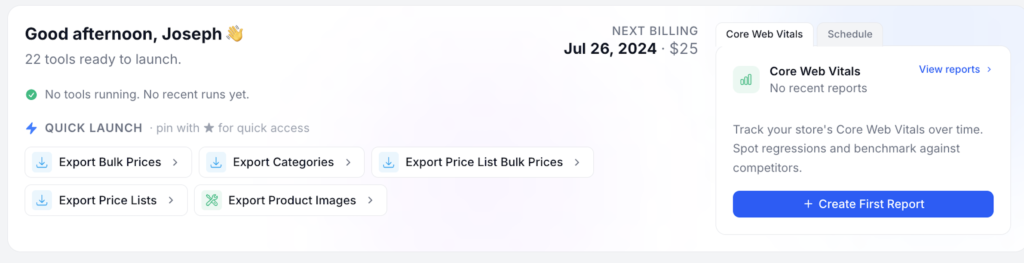
- Tabbed hero area – switch between Core Web Vitals and scheduled tools with a single click
- Faster Quick Launch – launch any tool instantly with loading indicators and live-updating favorites
- Live job progress – watch running jobs update in real time with progress bars and instant notifications

Scheduling
Scheduling got a significant upgrade to make recurring work easier to set up and easier to trust.
- Clearer naming – “Scheduled events” are now “Scheduled Tools” throughout the app
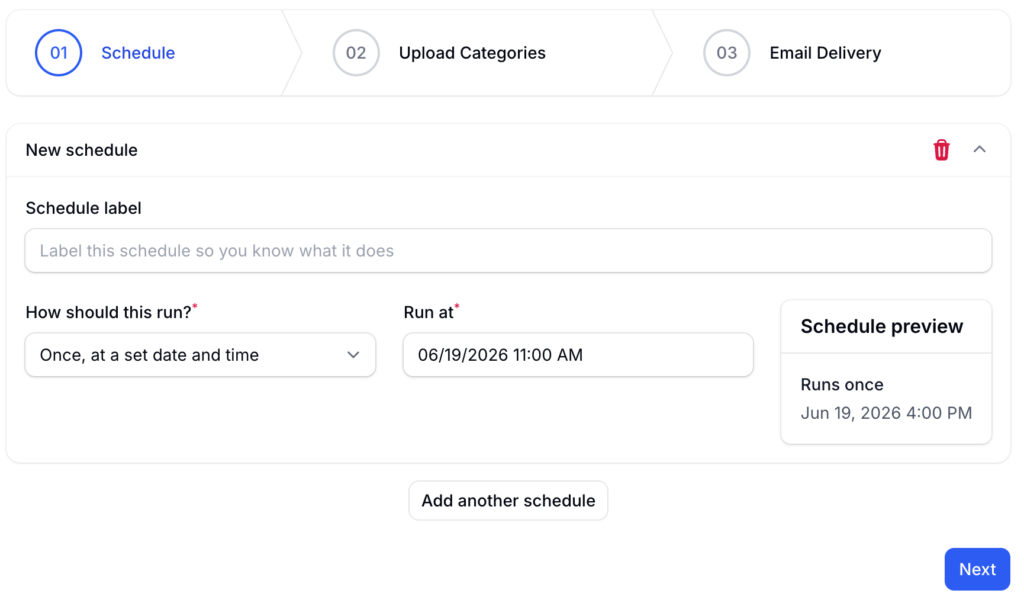
- Multiple schedules per job – run the same tool on several different schedules
- Schedule descriptions so you can label what each schedule is for
- Smarter notifications – emails go to the job’s email contact so the right person stays informed
- Quick “+” add-a-schedule button right from the dashboard calendar
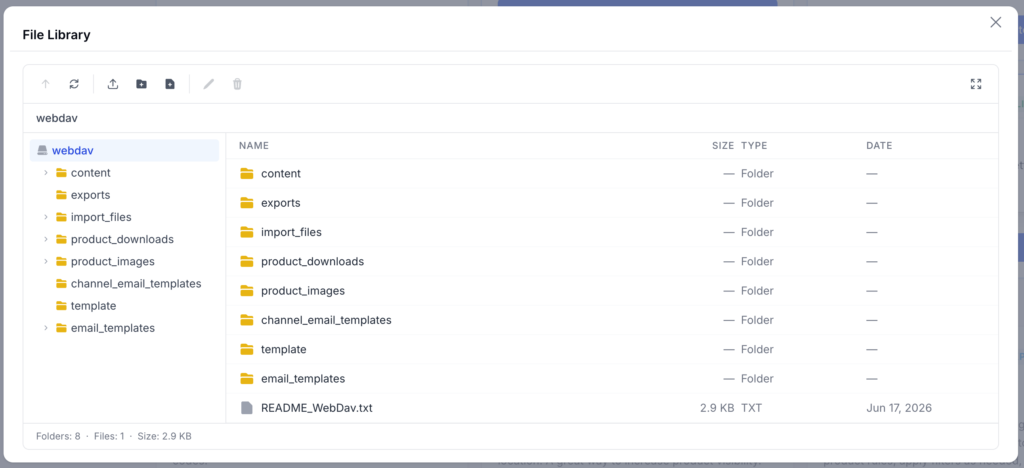
BigCommerce WebDAV File Manager ($ Add-On)
The WebDAV File Manager has been completely rebuilt as a fast, native part of the app – replacing the older embedded tool. It now looks and behaves like the rest of your dashboard, and it’s far more capable.
- Folder tree sidebar with breadcrumbs for quick navigation through your storage
- Drag-and-drop or button uploads straight into the folder you’re viewing
- Create, rename, and delete folders and files individually or in bulk
- Built-in text editor for editing CSV, HTML, CSS, JS, JSON, and more without leaving the page
- Inline image preview for your images
- Right-click context menu to copy a file’s URL, download, edit, rename, or delete
- Fullscreen mode and loading indicators on every action
- Clearer error handling – incompatible files are now rejected with more helpful information
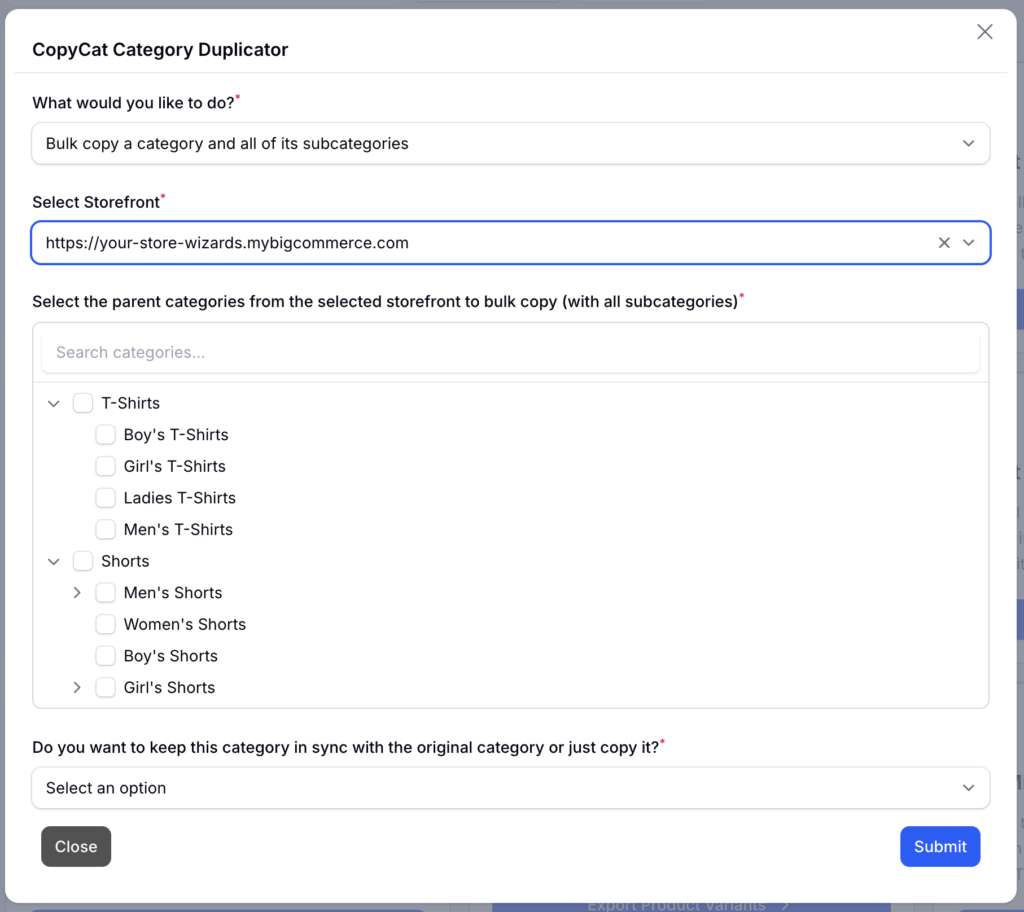
CopyCat Category Duplicator ($ Add-On)
CopyCat picked up three meaningful improvements.
- Bulk category copy with a tree picker – pick a category and its entire subtree and copy the whole branch in one action. Search, expand, collapse, and see a live preview of what will be created
- Copied products show up on your storefront again – we fixed a BigCommerce behavior change that had stopped mirrored products from appearing
- Optionally copy the category page banner – a new toggle copies the source category’s marketing banner onto the duplicated category (off by default)
Billing
- Clearer payment-decline notifications and the ability to update your billing information yourself when a payment needs attention
- Add-on-only customers now see a billing card with their charges
- Next-billing date and pricing now show on the dashboard
Imports & Other Tool Improvements
- Import from a URL or Google Sheet – standard CSV import tools can now pull data directly from a link, not just an uploaded file
- Catalog Price Updater now supports compare-at (sale) pricing
- New duplicate SKU finder to help you catch catalog data issues
- Various stability fixes across tool pages, exports, and pop-ups
Security & Platform Stability
Behind the scenes, we completed a major modernization of the platform that powers Your Store Tools. These updates strengthen security, improve performance, and lay the groundwork for features still to come.
The most noticeable benefit for you is faster dashboard and page load times – but most of this work is invisible by design, quietly keeping the app secure and reliable.
Ready to explore what’s new? Log in to your Your Store Tools dashboard and start using Version 3.0 today.
Important Update to Your Store Tools Free Plan for BigCommerce
April 20, 2026
We wanted to let you know about an important change coming to Your Store Tools for BigCommerce.
Effective May 4, 2026, we will be discontinuing the free plan for the BigCommerce version of Your Store Tools.
The Shopify version will continue to offer a free plan, as it includes far fewer tools than the BigCommerce platform.
This was not a decision we made lightly. Since launching Your Store Tools, we’ve been incredibly grateful for the support and interest from the BigCommerce community. But with the number of active free users continuing to grow, the costs associated with support, maintenance, and ongoing development have reached a point where offering a free version is no longer sustainable.
By upgrading to a Plus account, you’ll continue to have access to the same tools you currently use as a free user, along with several added benefits, including:
- • Unlimited tool usage instead of one use per day
- • File uploads of up to 5,000 records instead of 1,000
- • Monitoring for up to 3 URLs in the Core Web Vitals dashboard
We truly appreciate everyone who has supported Your Store Tools since launch. As we’re sure you can understand, the cost of supporting, maintaining, and continuing to develop new tools is not cheap.
We believe these tools provide exceptional value and real time savings for store owners. At just $10 per month, if the tools save you even a half hour of labor each month, they’ve more than paid for themselves.
Frequently Asked Questions
What happens to my free account on May 4th?
If you have a free account and log in on May 4th or anytime after, you will still be able to access your dashboard. However, when you attempt to use a tool, you’ll be prompted to upgrade. At that time, you can choose either the Plus or Premium package and select either monthly or annual billing.
What if I upgrade and later want to cancel?
If you choose a monthly plan, you can cancel at any time by clicking Billing in the dashboard and canceling your subscription. Your subscription will remain active until the date your next monthly payment would have been due.
If you choose an annual plan, you can cancel the same way and continue using the service until your annual subscription expires.
Please note that we do not offer prorated refunds for cancellations.
What’s the difference between Plus and Premium?
You can compare the two plans here: View Plans
How do I cancel my free account?
To cancel a free account, simply delete the API access in your BigCommerce store that you created when you originally signed up for Your Store Tools. Once that API access is removed, we no longer have access to your store.
I have a few à la carte tools. Will I have to pay more to use those now?
No. You can continue to use all of your à la carte tools just as you do now, and pricing for those tools will not be changing.
However, if you want to use any additional tools that require a subscription, you will need to sign up for either the Plus or Premium plan.
For example, if you currently have our free plan and also subscribe to Inventory Updater à la carte for $5 per month, you can continue using that tool without purchasing an additional subscription.
But if you want to use another tool, such as Product Import, that requires a plan subscription, you would need to upgrade to Plus or Premium.
If you currently subscribe to multiple à la carte tools, you may find that a Premium subscription offers better overall value.
Why are you getting rid of the free plan?
Since introducing Your Store Tools for BigCommerce, the number of free users has grown substantially, far beyond what we originally anticipated. The cost of supporting and maintaining that free user base is no longer sustainable.
That said, we believe these tools continue to offer outstanding value for store owners who want to save time and work more efficiently.