
Time-Saving Tools for eCommerce Stores
Think of Your Store Tools as a magical toolkit designed to streamline store operations, eliminating tedious tasks and saving valuable time.
Whether it’s managing pricing, updating product details, or making bulk changes, our tools reduce the number of steps required to complete essential tasks. Adjusting sale prices across multiple products becomes quick and effortless, while applying price changes to entire categories or catalogs takes just a few clicks.
By simplifying data management, Your Store Tools allows store owners to stay focused on growth rather than getting bogged down by repetitive admin work.
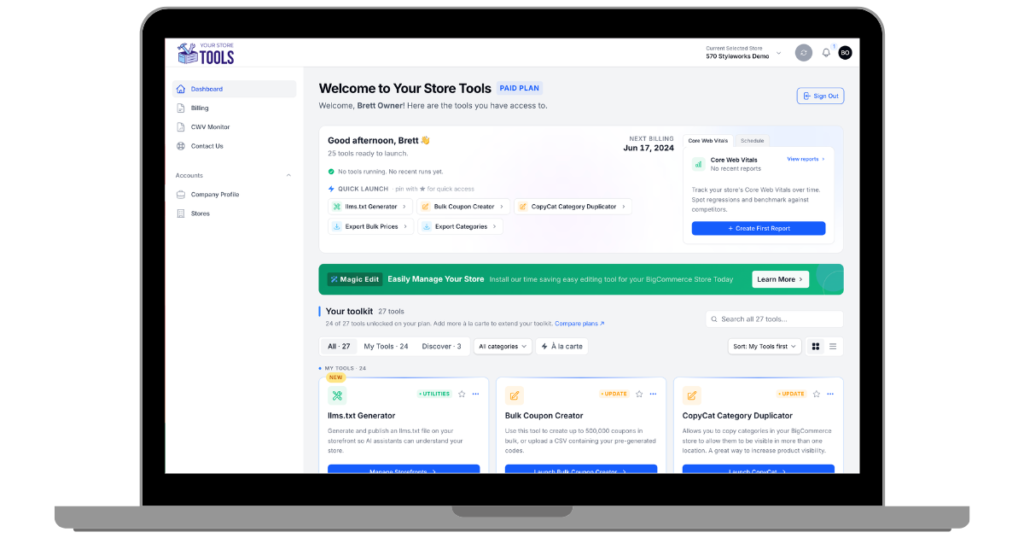
BigCommerce Tools
CWV Monitoring
Monitor your store's Core Web Vitals with our built-in Page Speed Insights tool.
Export Bulk Prices
This tool allows you to export your bulk pricing rules for offline review and editing. Use it with the Bulk Pricing Updater to quickly and easily update bulk prices. (Available for Premium subscribers, or those who subscribe to the Bulk Pricing Updater.)
Export Categories
Export all categories from your store into a CSV or Excel file, enabling you to make changes and updates to your categories that you can import later.
Export Complex Rules
The Export Complex Rules Tool for BigCommerce allows merchants to download their store’s existing product rules, apply filters as needed, and export them as a CSV or Excel file for offline editing before re-importing via our Import tool.
Export Price List Bulk Prices
Use this tool to export bulk pricing rules, then, utilize our Price List Bulk Pricing Updater to effortlessly update bulk prices within those lists. (Available for Premium subscribers, or those who subscribe to the Price List Bulk Pricing Updater.)
Export Price Lists
This tool enables you to export your price lists for easy editing or review. After making your changes, simply use our uploader to update the prices in your store. (Available for Premium subscribers, or those who subscribe to the Price List Updater.)
Export Product Images
This tool generates a ZIP file that contains your product images along with an optional CSV file to assist with importing them back into your store or another platform.
Export Products
Export your products into a CSV file for convenient offline editing, giving you the flexibility to make changes and updates to your product catalog offline for import later.
Export Variants
Export your product variants for offline editing and then use our import tool to update them in bulk.
Find Missing Data
Run this tool on your products to search for missing values in fields such as product description, UPC code, GTIN, image ALT tags and more!
Find Missing Images
Run this tool to make sure both parent and variant items have at least one image associated with them. If missing images are found, a CSV report will be sent so you can take action.
Import 301 Redirects
With this tool, you can avoid the tiresome task of entering 301 redirects individually by uploading them in a CSV file to your eCommerce store.
Import Categories
This tool provides a convenient and efficient way to manage categories within your store. You can easily create new categories or update existing ones by uploading a CSV file.
Import Complex Rules
The Import Complex Rules Tool for BigCommerce allows merchants to apply new pricing/product rules or update existing ones in bulk by uploading a CSV file—leveraging SKUs (not product IDs) to identify items and rule IDs to update or create rules.
Import Products
Use this tool to import a CSV file to your store to either update existing products that you edited offline or use it to create brand-new products in bulk.
Import Variants
This tool allows you to update product variant data such as price or weight using a CSV file.
llms.txt Generator
Generate and publish an llms.txt file on your storefront so AI assistants can understand your store.
Update Bulk Prices
Use a CSV file to create, update, or delete bulk pricing rules on items and give shoppers price breaks when they purchase more of a specific item.
Update Guest Orders
This tool links guest orders to customer accounts by matching email addresses. It automatically associates first-time guest orders with existing accounts for seamless order management.
Update Inventory
This tool allows you to update item and variant inventory levels using a CSV file. Allowable function include adjusting stock levels, turning inventory tracking on/off, and changing type of tracking.
Update Price Lists
Easily update pricing data for multiple price lists at once by uploading a CSV file.
Update Price Lists Bulk Prices
Use this tool to create, update or delete bulk prices on items and variants in price lists to offer shoppers an incentive to buy in bulk and save.
Update Prices
Quickly update price, sale price, MSRP, and cost on items and variants in bulk using the product SKU without the need for the BigCommerce Product ID.
Upload Images in Bulk
Upload product images in bulk with a ZIP file along with a supplemental file for mapping to the proper SKU.
WebDAV File Manager
Easily access files stored in your BigCommerce store using WebDAV via our web-based file browser. Quickly and efficiently upload images as well as content such as PDF's, audio files and downloadable files.
Shopify Tools
CWV Monitoring
Monitor your store's Core Web Vitals with our built-in Page Speed Insights tool.
Export Collections
Export your Shopify collections - including their rules, manually added products, exclusions, and metafields - to a spreadsheet.
Export Products
Export your Shopify products - variants, options, images, inventory, and collections - to a spreadsheet.
Find Missing Data
Run this tool on your products to search for missing values in fields such as product description, UPC code, image ALT tags and more!
Find Missing Images
Run this tool to make sure your items have at least one image associated with them. If missing images are found, a CSV report will be sent so you can take action.
Import Collections
Create, update, and delete Shopify collections - rules, manually added products, exclusions, and metafields - from a spreadsheet.
Import Products
Update Shopify products and variants by SKU - something Shopify’s own importer can’t do - or create new products and variants, from a spreadsheet.
Shopify File Manager
Media Manager for Shopify Files
Update Catalog Prices
This tool allows you to use a CSV file to update item pricing in multiple catalogs at once.
Update Inventory
This tool allows you to update item inventory levels using a CSV file. Allowable function include adjusting stock levels, turning inventory tracking on/off, and more.
Update Prices
Quickly update price, and compare at price in bulk by product SKU by uploading a CSV file.
Upload Images in Bulk
Upload product images in bulk with a ZIP file along with a supplemental file for mapping to the proper SKU.